
FTP – File transfer protocol is used to transfer files from one host to another over TCP . Configuring ftp server on linux is safe and secure .
In this article we can see how to configure ftp server on centos 6 . please follow the steps.
Configuring ftp server on Centos 6:
Step 1 » Vsftpd is a lightweight FTP server package for Centos (linux) . Start installing package by issuing below command.
[root@leela ~]# yum -y install vsftpd
Step 2 » After installation, Open the file /etc/vsftpd/vsftpd.conf which is the config file for vsftpd ( I mean FTP server ) .
Replace YES to NO in the below line.
anonymous_enable=NO
Find and Uncomment the below lines
local_enable=YES
write_enable=YES
and uncomment this line to limit the users to their home directories.
chroot_local_user=YES
Step 3 » Create a folder where you want to store FTP data. In my case i’m going to create in / ( root folder ) like below .
[root@leela ~]# mkdir /ftp
Step 4 » Now start creating users for accessing ftp server .
[root@leela ~]# useradd -d /ftp/krizna krizna
 [root@leela ~]# passwd krizna
 Changing password for user krizna.
 New password:
You just created username krizna with home directory /ftp/krizna .
Step 5 » Start vsftpd service by issuing the below command.
[root@leela ~]# service vsftpd start
and type this below command to start ftp server service automatically while booting.
[root@leela ~]# chkconfig --levels 235 vsftpd on
Step 6 » That’s it, Now we can check the FTP access .Create some files in /ftp/krizna folder
[root@leela ~]# touch /ftp/krizna/test
 [root@leela ~]# touch /ftp/krizna/test1
 [root@leela ~]# touch /ftp/krizna/test2
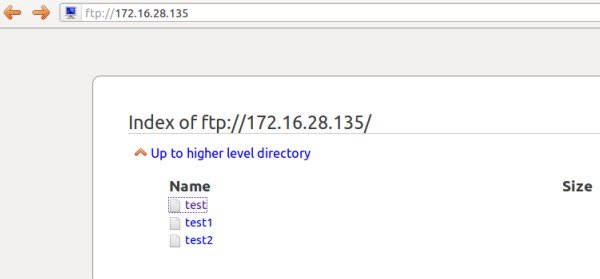
Now open ftp path in remote machine browser ftp://ftp-server-IP ( ftp://172.16.28.135 ). You can see the created files after authentication.
You can use Filezilla or winscp tools to upload/download files from FTP server.
Troubleshooting :
If you not able to connect ftp server , Disable the firewall ( iptables ) and selinux service on your ftp server .
Disable firewall ( Iptables ) »
[root@leela ~]# service iptables stop
 [root@leela ~]# chkconfig iptables off
Disable Selinux » open the file /etc/selinux/config and find the line
SELINUX=enforcing
and replace with
SELINUX=disabled
now reboot the server and try again.
i’ve been succed install and running vsftp, but i got trouble to login ftp with exist user in my system
always failed when login
it’s something wrong?
thats why i still being able to log into facebook i guess…
try reading /etc/vsftpd/user_list
i’ve been succed install and running vsftp, but i got trouble to login ftp with exist user in my system
always failed when login
it’s something wrong?
thats why i still being able to log into facebook i guess…
try reading /etc/vsftpd/user_list
Hi, i have configured vsftpd on centos 6.5, anonymous login is only enabled on it, i cant login using any other account..
plzzzzzzzz help
i did the same on a centos 6 , it works like a charm… just instead of -d /bla/bla i added –shell /sbin/nologin so my new users won´t peee on the system… try making it again maybe you miss a step
Hi, i have configured vsftpd on centos 6.5, anonymous login is only enabled on it, i cant login using any other account..
plzzzzzzzz help
i did the same on a centos 6 , it works like a charm… just instead of -d /bla/bla i added –shell /sbin/nologin so my new users won´t peee on the system… try making it again maybe you miss a step
i installed and configured FTP on centos 6.9. It seems done but I cannot login in FTP client with user root.
the Error said : 500 OOPS: cannot change directory:/root.
I may not understand clearly about FTP works.
Dear All,
Please help give me the solution.
Thanks
But I can login with normal user, not root.