
Copy to clipboard from browsers can be done by using zclip jquery plugin. Here we can see about how it’s work with multiple links .
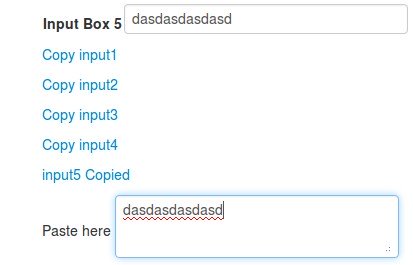
Here we require below files . just download these files for local use
» https://ajax.googleapis.com/ajax/libs/jquery/1.9.0/jquery.min.js
» http://www.steamdev.com/zclip/js/jquery.zclip.min.js
» http://zeroclipboard.googlecode.com/svn-history/r10/trunk/ZeroClipboard.swf
Now open jquery.zclip.min.js and set ZeroClipboard.swf file path.
path:"ZeroClipboard.swf"
Javascript and CSS :
<script src="jquery.min.js"></script>
<link href="bootstrap-combined.min.css" rel="stylesheet">
<script src="jquery.zclip.min.js"></script>
HTML part :
Input values and copy links are identified from their respective id attributes.
<input value="" type="text" id="input1">
<input value="" type="text" id="input2">
<input value="" type="text" id="input3">
<a href="#" class="copy" id="input1"><span id="input1">Copy input1</span></a>
<a href="#" class="copy" id="input2"><span id="input2">Copy input2</span></a>
<a href="#" class="copy" id="input3"><span id="input3">Copy input3</span></a>
Jquery code :
Jquery code is very simple , refer the comments .
$( "a.copy" ).each(function() { // This will loop all the link elements with class "copy"
	var id=$(this).attr("id");  // Get the unique value from attr "ID"
	$('a#'+id).zclip({             // Start processing with zclip
     	copy:function(){return $('input#'+id).val();}, // this will copy value from respective input field
	afterCopy:function(){             // this will be executed after copying
		$( "span" ).each(function(){
			var val=$(this).attr("id");
			$(this).text("Copy "+val);
		});
		 $('span#'+id).text(id+" Copied");
	}
    });
});
Full code :
<!DOCTYPE html>
<html lang="en">
<head>
<meta charset="utf-8">
<title></title>
<script src="jquery.min.js"></script>
<script src="jquery.zclip.min.js"></script>
</head>
<body>
	<h4>Demo Page</h4>
	<div>
		<table>
			<tr><td><b>Input Box 1 </b></td><td><input value="" type="text" id="input1"></td></tr>
			<tr><td><b>Input Box 2 </b></td><td><input value="" type="text" id="input2"></td></tr>
			<tr><td><b>Input Box 3 </b></td><td><input value="" type="text" id="input3"></td></tr>
			<tr><td><b>Input Box 4 </b></td><td><input value="" type="text" id="input4"></td></tr>
			<tr><td><b>Input Box 5 </b></td><td><input value="" type="text" id="input5"></td></tr>
		</table>
		<div>
			<p><a href="#" class="copy" id="input1"><span id="input1">Copy input1</span></a></p>
			<p><a href="#" class="copy" id="input2"><span id="input2">Copy input2</span></a></p>
			<p><a href="#" class="copy" id="input3"><span id="input3">Copy input3</span></a></p>
			<p><a href="#" class="copy" id="input4"><span id="input4">Copy input4</span></a></p>
			<p><a href="#" class="copy" id="input5"><span id="input5">Copy input5</span></a></p>
		</div>
		<div>Paste here
		<textarea></textarea></div>
	</div>
<script>
$( "a.copy" ).each(function() {
	var id=$(this).attr("id");
	$('a#'+id).zclip({
     	copy:function(){return $('input#'+id).val();},
	afterCopy:function(){
		$( "span" ).each(function(){
			var val=$(this).attr("id");
			$(this).text("Copy "+val);
		});
		 $('span#'+id).text(id+" Copied");
	}
    });
});
</script>
</body>
</html>
Leave a Reply